
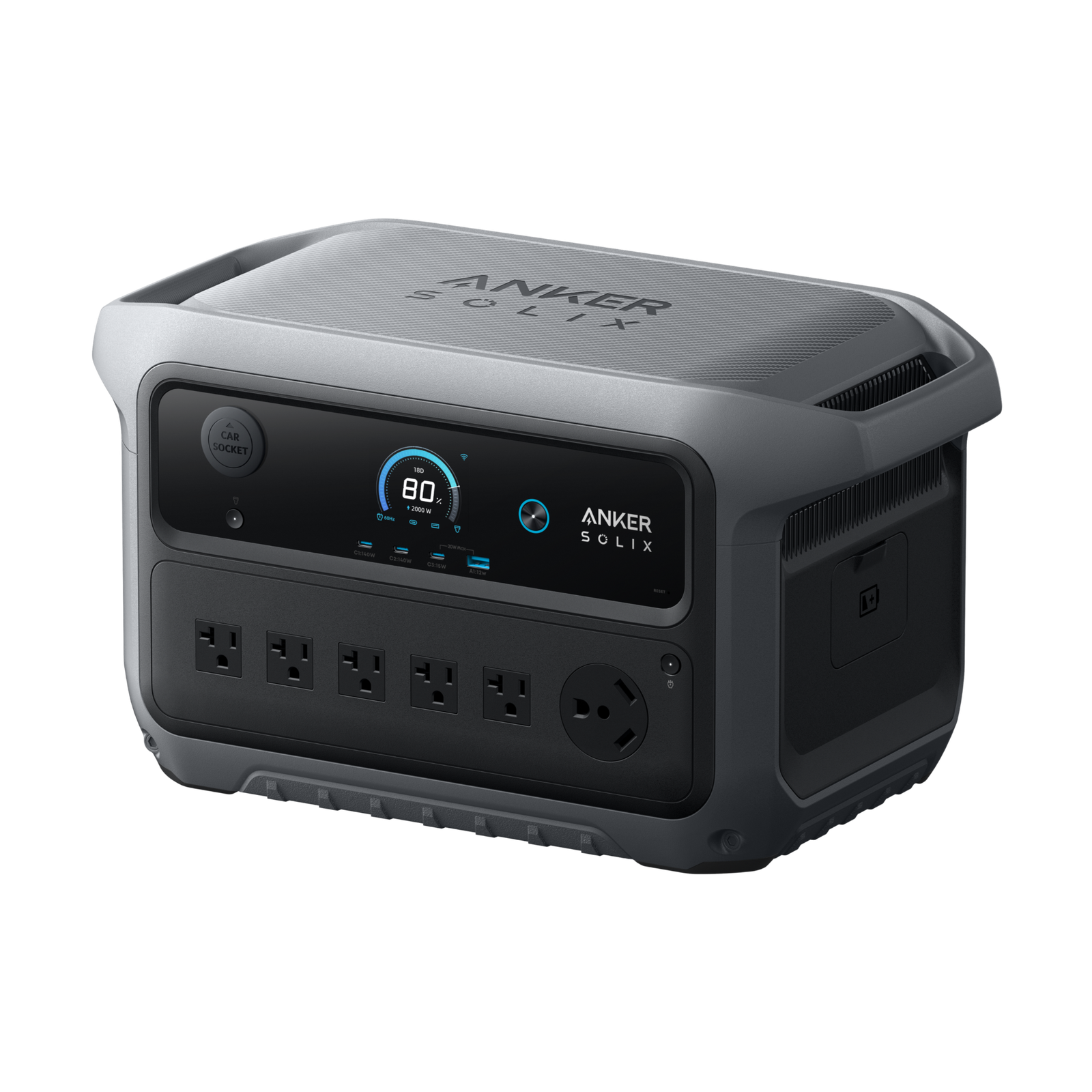
The Anker SOLIX C2000 Gen 2 is a 2,048Wh battery power station with 2,400W rated AC output in its US specifications. It is worth assessing when you need more stored energy than a compact charging station and want an expansion option. Whether it fits your refrigerator, RV or work setup depends on the loads, connections and outage duration you actually need.
Featured product photograph: Anker SOLIX. Manufacturer image used to identify the US model; no independent test is implied.
This is a research-based buying and planning guide, not a hands-on performance test. The specifications below come from Anker’s US documentation, reviewed October 13, 2026. We separate those specifications from illustrative calculations and questions that still need answering for your equipment. We do not promise a fixed number of refrigerator hours or savings on your electricity bill.
Confirm the exact model and US version
Start with the full product name and model identity. Anker’s US user guide identifies C2000 Gen 2 as A1783. Do not treat a similarly named C2000X, Plus version, another generation or a different regional model as interchangeable without checking its own documents. Similar capacity labels can hide differences in outlets, supported accessories and supply requirements.
Before paying, compare the listing with the manufacturer’s product page and the manual offered for the unit. Record the bundle contents, item identity and seller. A listing that includes an expansion battery or solar panel is a different purchase from a standalone station, even if the photograph looks almost the same.
The headline specifications and their limits
| US specification | Published value | Buying implication |
|---|---|---|
| Nominal stored energy | 2,048Wh | Use it as a capacity specification, not guaranteed delivered AC energy. |
| Rated AC output | 2,400W | Compare with the combined operating load. |
| Peak output | 4,000W | Read applicable limits before relying on motor-start capability. |
| US AC supply | 120V | A large watt figure does not establish 240V compatibility. |
| Expansion | BP2000 Gen 2 | Check the exact compatible battery and included connection equipment. |
| Station weight | 41.7lb | Plan handling and storage before calling the setup easily portable. |
The source is Anker’s US product specification page. A table is only the beginning of compatibility assessment. Identify the outlet you will use, check its rating, and include every connected device. Do not assume that each outlet independently delivers the station’s entire advertised output.
Decide which loads belong in your backup plan
Make a short priority list before comparing products: communications, lighting, a work device, refrigeration, or another specific need. Give each item its model, required supply and relevant operating information. Separate essential equipment from optional loads so you can deliberately conserve energy during a longer outage.
For a refrigerator, continuous operation and compressor startup are different checks. Use the appliance’s own documentation and ask its manufacturer or a qualified technician when startup information is unclear. Our refrigerator starting-watts guide explains why an annual energy label does not verify the instantaneous starting requirement.
A common mistake is adding a second motor load after assessing the first alone. Tell the equipment supplier what may already be running when a compressor starts. The compatibility question should describe that configuration, not just ask whether the station can run “a refrigerator.”
Estimate runtime without pretending it is a test result
Capacity and power answer different questions. Stored energy helps assess duration, while output capability helps assess which loads can operate. A planning calculation uses usable energy delivered to the equipment divided by representative average power. Conversion losses, the station’s own consumption and changing appliance demand need attention.
For a purely illustrative example, suppose a setup delivers 1,600Wh of usable energy to a steady 100W load. Division gives 16 hours. If that average load becomes 200W, the same assumed energy gives eight hours. The 1,600Wh assumption is not a measured C2000 Gen 2 result or a manufacturer’s usable-energy specification. It demonstrates how to make the assumptions visible.
Anker’s product page advertises refrigerator-duration examples, but a refrigerator’s model and operating conditions matter. Do not transfer a headline duration to your kitchen. For the broader decision, read our battery power station versus generator comparison and decide how power will continue after the initial energy supply is depleted.
Check the outlet rather than the connector name alone
The US specification lists a TT-30R connection, but gives its output as 120V, 20A maximum and 2,400W maximum. The familiar TT-30 connector therefore does not establish a full 30A shore-power supply. Compare the actual rating with the RV equipment you intend to use, including its starting requirements.
Do not interpret an RV-style outlet as a way to operate every appliance together. Ask the RV or appliance supplier about the exact load combination. For house wiring, use an appropriate professional assessment and approved interface; do not improvise a connection through an ordinary household receptacle.
If you need a particular voltage or installation feature, resolve that requirement first. Buying a larger battery or using a plug adapter does not establish that the station supplies a different voltage. Keep this check separate from the capacity comparison.
Plan charging for the outage you expect
Write down where charging energy will come from before, during and after an outage. Wall charging is useful when utility power is available, but the presence of a charger does not solve a prolonged loss of that source. Identify the supported alternative and its actual availability at your location.
Anker lists solar input of 11–60V, up to 17A and 800W through the specified input. Check panel and cable compatibility against the current instructions before connecting equipment. A panel’s watt label alone is not a complete compatibility check, and variable sunlight is not a guaranteed sustained charging input.
The product FAQ says USB-C ports are output only. Do not expect a laptop USB-C charger to recharge the station through those ports. If charging fails, first identify the intended input and supported equipment instead of moving cables between ports that serve different purposes.
What expansion changes
Anker documents compatibility with BP2000 Gen 2 expansion. Before buying it, verify the exact battery, required cable and permitted connection procedure. A similarly named expansion product should not be assumed compatible. Use the station and battery instructions together rather than relying on a marketplace title alone.
Evaluate expansion as a duration decision. More storage does not by itself establish a higher AC output rating for the station. If the appliance is incompatible with the output stage, adding battery capacity is not the missing compatibility assessment.
Price the complete arrangement: station, compatible expansion equipment, charging equipment, storage space and handling. Compare that total with the backup goal. A lower standalone price can be less relevant if your actual plan requires accessories that the alternative bundle already includes.
Use backup switching carefully
Anker publishes a 10ms UPS specification. This is a switching-time specification, not proof that the unit is compatible with every sensitive device or that your work can never be interrupted. For networking or office equipment, check the device requirements and test the permitted arrangement before relying on it.
If loss of power has serious consequences, obtain the equipment manufacturer’s guidance and an appropriate backup plan. Do not use a consumer product’s general marketing language as approval for a specialized application. Keep a separate procedure for what happens if the station shuts down or runs out of energy.
A practical setup and verification sequence
- Confirm the US model and obtain its current guide.
- Inspect the supplied equipment and choose a location that follows the instructions.
- Charge through a supported input and confirm the displayed status.
- Identify the output needed by the intended device.
- Connect only equipment assessed as compatible, using suitable cables.
- Observe the display and device operation without bypassing any warning or protective shutdown.
- Record the load configuration and the limited result of that check.
A brief successful run is useful but limited evidence. It may not include a compressor’s most demanding cycle, every household load overlap or the full duration of a planned outage. Keep those limits in the record. The next assessment should build on observed conditions rather than turning a short test into a blanket claim.
Troubleshooting without risky experimentation
A device does not operate: check the selected output, whether it is enabled, the device’s required supply and the station’s warning information. Compare the load with the documented limits. If protection operates repeatedly, stop and ask the relevant manufacturer about compatibility.
Runtime seems short: record the actual load combination, initial charge, operating time and conditions. Compare average consumption with your estimate. A display reading from one moment does not necessarily represent a cycling appliance’s average over several hours.
Solar charging is inconsistent: separate panel compatibility from changing available sunlight. Review placement and input information under the instructions. Do not alter connectors or exceed an input limit to chase the advertised charging speed.
An accessory does not connect: compare the complete model names and approved cable. Ask support to confirm the pairing before attempting an adapter or substitute connection.
Who should consider it, and who needs a different plan?
Consider this model when your assessed loads fit the US output arrangement, its storage fits your expected duration, and you can manage its weight and charging plan. The expansion option may be useful when you want to add compatible storage later instead of buying the largest setup immediately.
Consider another arrangement when the required supply is incompatible, you cannot replenish energy during the intended outage, or the practical handling and storage requirements do not fit. Make that decision from the actual workload and location. Brand popularity and an attractive peak number cannot answer those questions.
Frequently asked questions
Is 4,000W its ordinary continuous output? No. Anker lists 2,400W rated output and a separate peak figure. Use the applicable rating and conditions for the equipment assessment.
Can I charge it through USB-C? The product FAQ says those ports are output only. Use a supported charging input.
Does expansion automatically double appliance power? Do not infer that. Check the station’s output specification separately from added stored energy.
Does the TT-30 connection guarantee 30A output? No. Read the actual output rating published for that port.
Have we tested the advertised refrigerator duration? No. This guide is based on official specifications and transparent planning, not independent runtime measurements.
Official references
Reviewed October 13, 2026: US product specifications and FAQ; US user guide; BP2000 Gen 2 guide.